PictureGuide searches for new face suggestions when...
- new images have been added and faces have been recognized on them
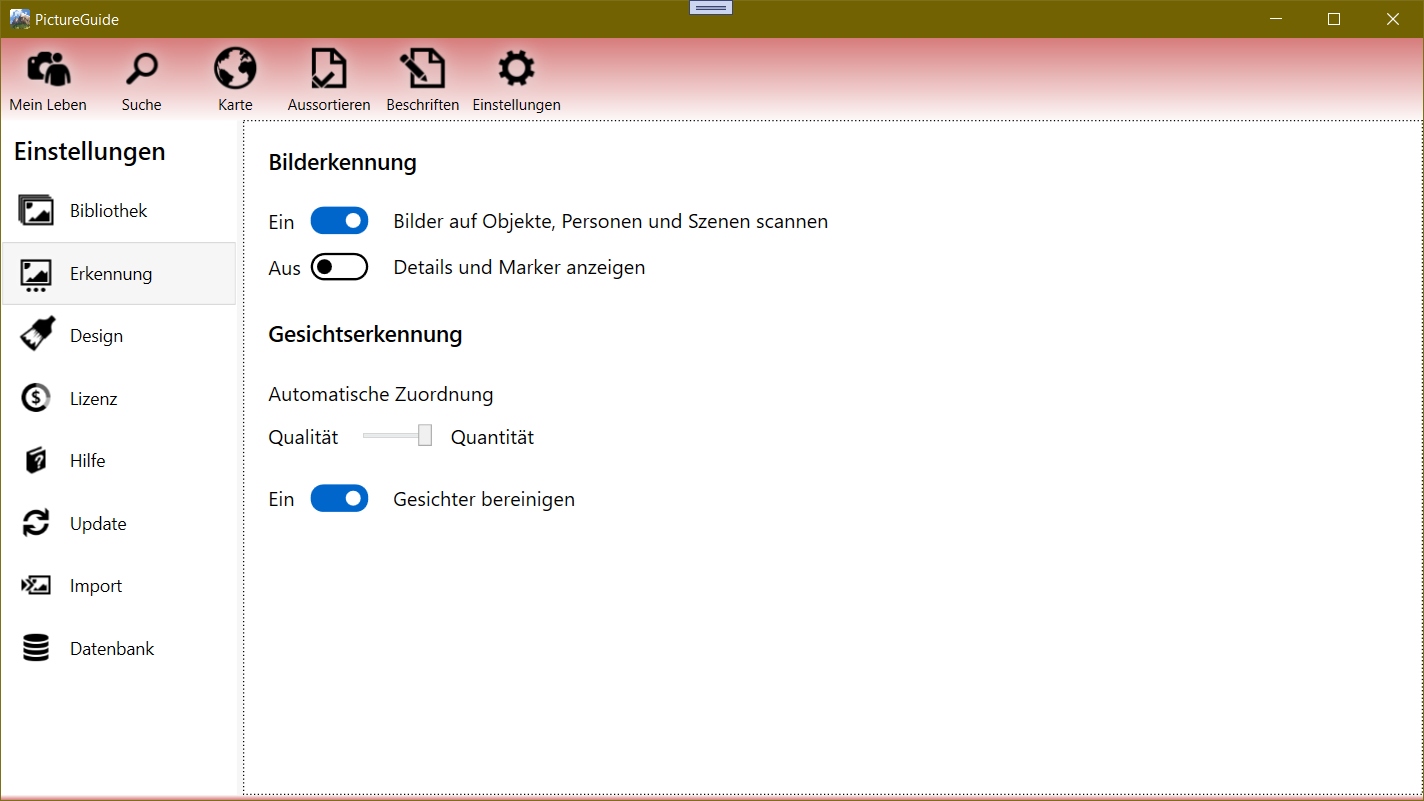
- Image recognition has been turned on (again) under Settings > Recognition
- TheSettings > Detection > Automatic Assignment slider has been changed
- 45sec have passed since the last time faces were assigned/rejected
To get more face suggestions in general:
Change the setting under Settings > Recognize > group faces.
If you move the slider to the right (quantity), faces that do not fit clearly will also be suggested. You can then add them manually. If you notice any irregularities, change the setting back to the left. (Quality)
If a lot of time has passed between a person's shots, then they cannot be automatically suggested. Therefore, add a face manually first. Further faces in this period will then be automatically assigned/suggested again.
Delete face suggestions
- Press the CTRL key while the detection is turned on.
- Press Ctrl+Shift to reset face rejections
Delete personal data and facial recognition
For data protection reasons, etc., it may be necessary to delete all existing data.
In the Settings view, first press CTRL+L.
Now the further processes are activated and are logged.
Press CTRL+ALT+R to delete all face and person data.
If you re-enable image recognition, the images will be scanned for faces again and can be named again.